Claude Code hosting
Built it with Claude Code? Put it online from the same session.
A real example: an idea board
You, message 1
Make a small idea board app in this folder: Node with Express and PostgreSQL (the pg package). One page where people post an idea and upvote other ideas, sorted by votes. Read DATABASE_URL and PORT from the environment, keep the schema in a migrations folder, and commit it to git when it's done.
Claude Code: Wrote the app (Express, the pg package, a migrations folder and a small runner for it), tested it against a temporary PostgreSQL it started for the purpose, and committed it. Nothing was on LazyFrog yet.
You, message 2
Now put it on LazyFrog so I can see it running with a real database. Don't publish yet, I'll look at the preview first. Git can already push to git.lazyfrog.dev with my access token.
Claude Code: Read LazyFrog's guide and made a project. It merged the project's starter files into the repository, kept its own page, pointed services.json at the app with its migration runner as the migrate command, renumbered the migration, rewrote the Dockerfile for Node, and pushed. Then it posted and voted on the preview in a real browser and checked the database matched.
You, message 3
Looks good. Publish it.
Claude Code: Ran a test publish, which built the app, applied both migrations to a copy of the live database and started it. Then it published and checked the live site and its database.
You, message 4
Add a way to sort the ideas by newest as well as by votes. Push it, check it on the preview, then publish it.
Claude Code: Changed the code and the page, added a migration with an index for the new order, and pushed. It tried both orders on the preview in a browser and published again; the publish applied the new migration to the live database.
$ git push lazyfrog main
remote: LazyFrog: received 17 kB; checking it
remote: LazyFrog: the preview is at 57ababb; starting it (snapshot pre-git-push-… taken first)
remote: LazyFrog: installing (npm ci || npm install)
remote: LazyFrog: migrating the preview database
remote: LazyFrog: restarting the preview
remote: LazyFrog: preview updated: https://p-….lazyfrog.app · build 3 s · migrations ran (node migrate.js)
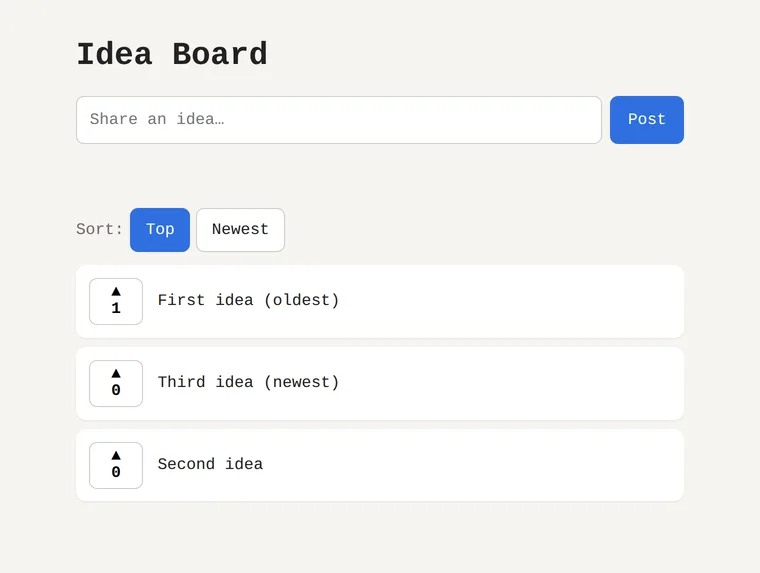
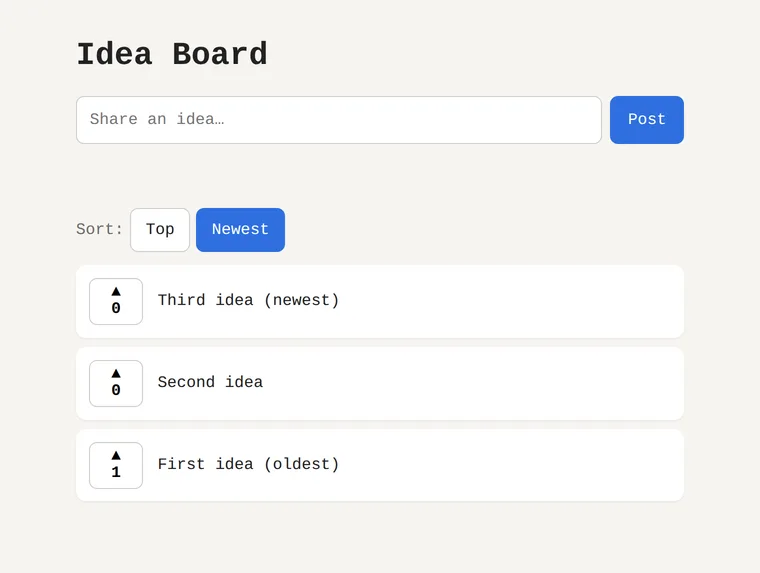
The preview after the fourth message, with Claude Code's test ideas. The live site has its own database and started empty.
Set it up once
$ claude mcp add --transport http lazyfrog https://mcp.lazyfrog.dev/mcp
- 1.In Claude Code, type
/mcp, chooselazyfrogand Authenticate, then sign in with your LazyFrog account (the steps). - 2.Make an access token in your LazyFrog account (Account › Access tokens, “Read and write”), so git can push. Claude Code can't make one for you.
- 3.Ask Claude Code to put your app on LazyFrog. A project's own files tell it the rest: new projects carry
.mcp.jsonandCLAUDE.md.
Your database
- Every project has its own PostgreSQL: one for the preview and one for the live site, kept separate.
- Schema changes are files in
migrations/, applied on every push (a snapshot first) and on every publish, after a rehearsal on a copy of the live data. A framework's own migration tool goes inservices.jsonas"migrate"instead. - Claude Code works with it through LazyFrog's tools: the schema, the rows and SQL queries. It isn't reachable from your machine.
- On your machine,
compose.ymlruns the app with a PostgreSQL of its own and the sameDATABASE_URL.
What else a project gives Claude Code
- Real processes in any language, declared in
services.json: web, API, workers and scheduled jobs. - Secrets set in your LazyFrog account, never in git: a push that contains one is refused, with the file and line.
- Logs, screenshots and real-browser tries of the preview, through the tools.
- Publishing with no downtime, an earlier version back in seconds, and a snapshot before every push.
- Code that's yours: a git repository you can clone, and an export with your data that runs anywhere with docker compose up.
Working this way, step by step: working from a checkout. Everything else for developers: for developers.
What it costs
- Building and trying is free: one project with its database and a preview. Free has no live site.
- A live site starts with Hobby at $9 a month (excluding VAT and sales tax): 3 projects, a live address, your own domain and one live site always on. Pro is $29 with 10 projects and three always on.
- LazyFrog never charges for Claude's work and sells no AI credits. Claude Code uses your Claude plan, as always.
Good to know
- One AI works in a project at a time; another waits a minute and tries again.
- A push only ever moves the preview forward: a forced push is refused, and so is one that would drop changes made in the preview since your last pull.
- The preview and a quiet live site sleep after 15 minutes and wake on the next visit, push or call.
- LazyFrog runs your services.json commands, not Docker images of your own.
Questions
- How do I deploy from Claude Code?
- Connect LazyFrog once with claude mcp add and sign in, make an access token so git can push, and ask Claude Code to put the app on LazyFrog. It makes a project, pushes your code, checks the preview and publishes when you say so.
- Does my code need to be on GitHub?
- No. Code in a folder on your machine is pushed straight to the project's own git address. Code on GitHub can be imported from there instead, and a GitHub connection can publish every push if you turn that on.
- How does the database work?
- Every project has its own PostgreSQL, one for the preview and one for the live site. Schema changes are files in migrations/, applied on every push and, after a rehearsal on a copy of the live data, on every publish; your own migration tool works too. Claude Code reads the database through LazyFrog's tools; it isn't reachable from your machine.
- Which languages and frameworks run?
- Anything that runs as a process listening on $PORT: Node, Python, Go, Ruby, PHP, Java and more, with PostgreSQL in every project. There are starting templates for Next.js, FastAPI and static sites.
- Can I bring my own Docker image?
- No. LazyFrog runs the commands in your services.json in its own workspace image. Your Dockerfile and compose.yml are there to run the same code anywhere else, and an export carries the code, the data and the steps.
- Will Claude Code publish without asking?
- No. LazyFrog's guide tells it to publish only when you ask, and every publish rehearses on a copy of the live database first. Pushes only change the preview.
- Is the idea board example real?
- Yes. Claude Code wrote it in a folder and put it on LazyFrog on 12 November 2026 from the four messages on this page, in a container that could see only that folder.